- Ontvangen bedankjes 0
link naar artikel wordt niet meegegeven
-
Onderwerp Auteur
- Gebruiker
-

Minder
Lees meer
06 aug 2021 08:49 #23004
door
Beantwoord door in topic link naar artikel wordt niet meegegeven
mijn .htaccess is nu:
daarnaast staat er nog een htaccess.txt bestand
Code:
#Rewrite everything to https
RewriteEngine On
RewriteCond %{HTTPS} !=on
RewriteRule ^(.*)$ https://%{HTTP_HOST}%{REQUEST_URI} [L,R=301]
<FilesMatch "\.svg$">
<IfModule mod_headers.c>
Header always set Content-Security-Policy "script-src 'none'"
</IfModule>
</FilesMatch>
Code:
##
# @package Joomla
# @copyright Copyright (C) 2005 - 2020 Open Source Matters. All rights reserved.
# @license GNU General Public License version 2 or later; see LICENSE.txt
##
##
# READ THIS COMPLETELY IF YOU CHOOSE TO USE THIS FILE!
#
# The line 'Options +FollowSymLinks' may cause problems with some server configurations.
# It is required for the use of Apache mod_rewrite, but it may have already been set by
# your server administrator in a way that disallows changing it in this .htaccess file.
# If using it causes your site to produce an error, comment it out (add # to the
# beginning of the line), reload your site in your browser and test your sef urls. If
# they work, then it has been set by your server administrator and you do not need to
# set it here.
##
## No directory listings
<IfModule mod_autoindex.c>
IndexIgnore *
</IfModule>
## Suppress mime type detection in browsers for unknown types
<IfModule mod_headers.c>
Header always set X-Content-Type-Options "nosniff"
##
# Disable Federated Learning of Cohorts (FLoC)
# If you uncomment the below directive you have to allow this technology in the
# Global Configuration of Joomla. Read more about this in the Post-Installation
# message in the backend.
##
# Header always set Permissions-Policy "interest-cohort=()"
</IfModule>
## Can be commented out if causes errors, see notes above.
Options +FollowSymlinks
Options -Indexes
## Disable inline JavaScript when directly opening SVG files or embedding them with the object-tag
<FilesMatch "\.svg$">
<IfModule mod_headers.c>
Header always set Content-Security-Policy "script-src 'none'"
</IfModule>
</FilesMatch>
## Mod_rewrite in use.
RewriteEngine On
## Begin - Rewrite rules to block out some common exploits.
# If you experience problems on your site then comment out the operations listed
# below by adding a # to the beginning of the line.
# This attempts to block the most common type of exploit `attempts` on Joomla!
#
# Block any script trying to base64_encode data within the URL.
RewriteCond %{QUERY_STRING} base64_encode[^(]*\([^)]*\) [OR]
# Block any script that includes a <script> tag in URL.
RewriteCond %{QUERY_STRING} (<|%3C)([^s]*s)+cript.*(>|%3E) [NC,OR]
# Block any script trying to set a PHP GLOBALS variable via URL.
RewriteCond %{QUERY_STRING} GLOBALS(=|\[|\%[0-9A-Z]{0,2}) [OR]
# Block any script trying to modify a _REQUEST variable via URL.
RewriteCond %{QUERY_STRING} _REQUEST(=|\[|\%[0-9A-Z]{0,2})
# Return 403 Forbidden header and show the content of the root home page
RewriteRule .* index.php [F]
#
## End - Rewrite rules to block out some common exploits.
## Begin - Custom redirects
#
# If you need to redirect some pages, or set a canonical non-www to
# www redirect (or vice versa), place that code here. Ensure those
# redirects use the correct RewriteRule syntax and the [R=301,L] flags.
#
## End - Custom redirects
##
# Uncomment the following line if your webserver's URL
# is not directly related to physical file paths.
# Update Your Joomla! Directory (just / for root).
##
# RewriteBase /
## Begin - Joomla! core SEF Section.
#
RewriteRule .* - [E=HTTP_AUTHORIZATION:%{HTTP:Authorization}]
#
# If the requested path and file is not /index.php and the request
# has not already been internally rewritten to the index.php script
RewriteCond %{REQUEST_URI} !^/index\.php
# and the requested path and file doesn't directly match a physical file
RewriteCond %{REQUEST_FILENAME} !-f
# and the requested path and file doesn't directly match a physical folder
RewriteCond %{REQUEST_FILENAME} !-d
# internally rewrite the request to the index.php script
RewriteRule .* index.php [L]
#
## End - Joomla! core SEF Section.
Discussie gesloten.
- Leen
-
- Gebruiker
-
- hobbie

Minder
Lees meer
- Berichten: 54
- Ontvangen bedankjes 0
06 aug 2021 08:59 #23005
door Leen
lvda
Beantwoord door Leen in topic link naar artikel wordt niet meegegeven
Wat je ook kan proberen is de gebruikte .htaccess even een ander naam te geven bv oud.access
en dan de htaccess.txt te hernoemen naar .htaccess
ook even alle cache etc opschonen en ook je webbrowser.
en wat ook wel eens wil helpen om bij
administrator > artikelen > Artikelen: Categorieën alles aanvinken en op knop opnieuw opbouwen te klikken
en deze handeling kan je ook bij de administrator > menu > Menu's: Items (Main Menu)
en dan de htaccess.txt te hernoemen naar .htaccess
ook even alle cache etc opschonen en ook je webbrowser.
en wat ook wel eens wil helpen om bij
administrator > artikelen > Artikelen: Categorieën alles aanvinken en op knop opnieuw opbouwen te klikken
en deze handeling kan je ook bij de administrator > menu > Menu's: Items (Main Menu)
lvda
Discussie gesloten.
-
- Gebruiker
-
Minder
Lees meer
- Ontvangen bedankjes 0
06 aug 2021 09:23 #23006
door
Beantwoord door in topic link naar artikel wordt niet meegegeven
OK. SEO staat weer zoals jij aangaf.
.htaccess hernoemd
htaccess.txt hernoemt naar .htaccess
nog wel even toegevopegd:
#Rewrite everything to https
RewriteEngine On
RewriteCond %{HTTPS} !=on
RewriteRule ^(.*)$ https://%{HTTP_HOST}%{REQUEST_URI} [L,R=301]
Dus nu ook met "Gebruik URL herschrijven" op JQA worden artikelen ook goed getoond.
hij toont: eenfictievenietURL.nl/test
en niet: eenfictievenietURL.nl/index.php?option=c...&view=article&id=105
Maar de menu-opties die GEENsubmenuoptie onder zich hebben, geven nog een 404 melding.
omdat hij eenfictievenietURL.nl/menuregel niet kan vinden.
Artikel opties: routing: staat op vernieuwend en JA
.htaccess hernoemd
htaccess.txt hernoemt naar .htaccess
nog wel even toegevopegd:
#Rewrite everything to https
RewriteEngine On
RewriteCond %{HTTPS} !=on
RewriteRule ^(.*)$ https://%{HTTP_HOST}%{REQUEST_URI} [L,R=301]
Dus nu ook met "Gebruik URL herschrijven" op JQA worden artikelen ook goed getoond.
hij toont: eenfictievenietURL.nl/test
en niet: eenfictievenietURL.nl/index.php?option=c...&view=article&id=105
Maar de menu-opties die GEENsubmenuoptie onder zich hebben, geven nog een 404 melding.
omdat hij eenfictievenietURL.nl/menuregel niet kan vinden.
Artikel opties: routing: staat op vernieuwend en JA
Discussie gesloten.
-
- Gebruiker
-
Minder
Lees meer
- Ontvangen bedankjes 0
06 aug 2021 09:38 #23007
door
Beantwoord door in topic link naar artikel wordt niet meegegeven
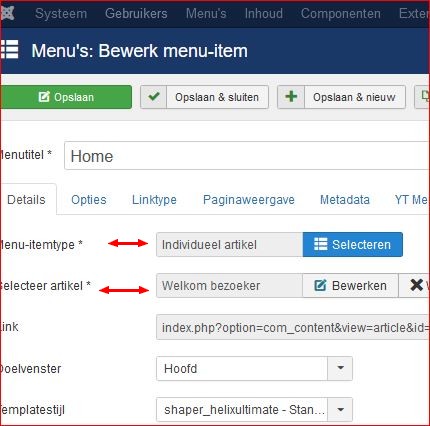
Die menu-opties die GEEN submenuoptie onder zich hebben, hadden als Menu-itemtype ook "Individueel artikel".
Ik heb daar nu van gemaakt: Categorielijst.
en een "lege categorie" menu- aangemaakt.
Als ik nu op zo'n menu-optie (zonder sub regels) klik, krijg ik:
"Deze categorie bevat geen artikelen. Indien subcategorieën getoond worden op deze pagina kunnen deze artikelen bevatten."
Maar geen 404-error.
is dit een goede oplossing of is er iets beters?
---> ah, gevonden: Menu-kop.
Volgens mij werkt het nu goed.
Bedankt voor jullie hulp !!
Ik heb daar nu van gemaakt: Categorielijst.
en een "lege categorie" menu- aangemaakt.
Als ik nu op zo'n menu-optie (zonder sub regels) klik, krijg ik:
"Deze categorie bevat geen artikelen. Indien subcategorieën getoond worden op deze pagina kunnen deze artikelen bevatten."
Maar geen 404-error.
is dit een goede oplossing of is er iets beters?
---> ah, gevonden: Menu-kop.
Volgens mij werkt het nu goed.
Bedankt voor jullie hulp !!
Discussie gesloten.
- Leen
-
- Gebruiker
-
- hobbie
Minder
Lees meer
- Berichten: 54
- Ontvangen bedankjes 0
06 aug 2021 09:48 #23008
door Leen
lvda
Beantwoord door Leen in topic link naar artikel wordt niet meegegeven
de menu
jou 2e oplossing is denk ik ook goed het is normaal dat een categorie lijst of categorie blog waar nog geen artikelen instaan ook niet getoond worden.
ps
Ik begrijp dus dat je website nog aan vullen/maken bent ?.
had die wel een bestaande artikel van je toegewezen gekregen ?(dan had misschien menu opnieuw opbouwen functie kunnen helpen) maarMenu-itemtype ook "Individueel artikel".
jou 2e oplossing is denk ik ook goed het is normaal dat een categorie lijst of categorie blog waar nog geen artikelen instaan ook niet getoond worden.
ps
Ik begrijp dus dat je website nog aan vullen/maken bent ?.
lvda
Bijlagen:
Discussie gesloten.
-
- Gebruiker
-
Minder
Lees meer
- Ontvangen bedankjes 0
06 aug 2021 10:15 #23009
door
Beantwoord door in topic link naar artikel wordt niet meegegeven
Dank Leen.
Het is voor een vriend van me. ik help hem af en toe, en hij had nu dit probleem.
dus even ingedoken.
Het is voor een vriend van me. ik help hem af en toe, en hij had nu dit probleem.
dus even ingedoken.
Discussie gesloten.